Building a Document Management System with eXist-db and Docker - Part 1
15 Dec 2025
How I built a production-ready document management system using native XML databases, Docker Compose, and modern DevOps practices
Introduction
As a DevOps engineer, I wanted to build a project that showcases practical skills beyond the typical CRUD app. I needed something that demonstrates:
- Multi-container orchestration
- REST API integration
- Working with unconventional databases
- Real troubleshooting and problem-solving
The result? A document management system using eXist-db (a native XML database), PHP, Nginx, and Docker Compose - all exposed securely via Cloudflare Tunnel.
Live demo: existdbapp.lioprojects.xyz
Why eXist-db?
Most portfolio projects use MySQL or PostgreSQL. I wanted to work with something different that would stand out in interviews. eXist-db is:
- A native XML database (not just XML support in SQL)
- Query-able with XQuery (a functional language for XML)
- Used in digital humanities, archives, and semantic web projects
- Perfect for document-centric applications
It's also rare enough that demonstrating competency with it shows adaptability and willingness to learn unconventional technologies.
Architecture Overview
The system consists of three main components:
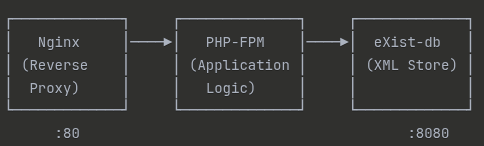
Why this stack?
- Nginx: Industry-standard reverse proxy, lightweight
- PHP-FPM: Separates web server from application logic (better performance)
- eXist-db: Native XML storage with built-in REST API
- Docker Compose: Reproducible infrastructure, easy deployment
The Document Upload Flow
Here's what happens when a user uploads a document:
1. User Submits Form (index.php)
<form action="upload.php" method="POST" enctype="multipart/form-data">
    <input type="text" name="title" placeholder="Document Title" required>
    <input type="text" name="author" placeholder="Author" required>
    <input type="file" name="file" required>
    <button type="submit">Upload</button>
</form>
2. PHP Processes Upload (upload.php)
// Extract form data
$title = htmlspecialchars($_POST['title'], ENT_QUOTES, 'UTF-8');
$author = htmlspecialchars($_POST['author'], ENT_QUOTES, 'UTF-8');
$fileContent = file_get_contents($_FILES['file']['tmp_name']);

// Encode file in Base64 for XML storage
$base64Content = base64_encode($fileContent);

// Generate unique ID
$docId = uniqid('doc_', true);
3. Create XML Document
$xml = new DOMDocument('1.0', 'UTF-8');
$document = $xml->createElement('document');

$document->appendChild($xml->createElement('id', $docId));
$document->appendChild($xml->createElement('title', $title));
$document->appendChild($xml->createElement('author', $author));
$document->appendChild($xml->createElement('created', date('Y-m-d H:i:s')));
$document->appendChild($xml->createElement('filename', $filename));

// Embed file content
$contentNode = $xml->createElement('content');
$contentNode->setAttribute('encoding', 'base64');
$contentNode->appendChild($xml->createTextNode($base64Content));
$document->appendChild($contentNode);
Why XML instead of JSON?
- eXist-db is optimized for XML
- XML provides better schema validation
- XQuery is more powerful for hierarchical data
- Demonstrates working with industry-standard formats (DocBook, TEI, etc.)
4. Send to eXist-db via REST API
$existUrl = "http://exist:8080/exist/rest/db/docs/{$docId}.xml";

$ch = curl_init($existUrl);
curl_setopt($ch, CURLOPT_CUSTOMREQUEST, "PUT");
curl_setopt($ch, CURLOPT_HTTPHEADER, ['Content-Type: application/xml']);
curl_setopt($ch, CURLOPT_POSTFIELDS, $xml->saveXML());
curl_setopt($ch, CURLOPT_USERPWD, "admin:");
curl_setopt($ch, CURLOPT_RETURNTRANSFER, true);

$response = curl_exec($ch);
$httpCode = curl_getinfo($ch, CURLINFO_HTTP_CODE);
Key DevOps concepts here:
- REST API integration (PUT method for creation)
- Basic authentication handling
- Error handling (checking HTTP codes)
- Container networking (using service name "exist" instead of localhost)
Docker Compose Configuration
The magic happens in "docker-compose.yml":
version: "3.8"

services:
  php:
    image: php:8.2-fpm-alpine
    volumes:
      - ./php-app:/var/www/html
    command: sh -c "apk add --no-cache curl && php-fpm"
    networks:
      - app-network

  nginx:
    image: nginx:alpine
    ports:
      - "8081:80"
    volumes:
      - ./php-app:/var/www/html
      - ./nginx/default.conf:/etc/nginx/conf.d/default.conf
    depends_on:
      - php
    networks:
      - app-network

  exist:
    image: existdb/existdb:5.3.0
    ports:
      - "8080:8080"
    volumes:
      - exist-data:/exist-data
    networks:
      - app-network

networks:
  app-network:
    driver: bridge

volumes:
  exist-data:
Why these choices?
- Alpine images: Smaller attack surface, faster pulls
- Named volumes: Docker manages persistence, no permission issues
- Custom network: Services communicate by name (DNS resolution)
- Version pinning: "existdb:5.3.0" (more on this later)
Nginx Configuration
server {
    listen 80;
    server_name _;  # Accepts any hostname (crucial for Cloudflare Tunnel)

    root /var/www/html;
    index index.php index.html;

    location ~ \.php$ {
        fastcgi_pass php-fpm:9000;  # Container service name
        fastcgi_index index.php;
        include fastcgi_params;
        fastcgi_param SCRIPT_FILENAME $document_root$fastcgi_script_name;
    }

    location / {
        try_files $uri $uri/ /index.php?$query_string;
    }
}
Critical detail: "server_name _" accepts any "Host" header. This is essential for Cloudflare Tunnel, which may send different headers than your domain name.
What I Learned
Building this taught me several valuable lessons:
1. Container Networking is Not "localhost"
Initial mistake:
$existUrl = "http://localhost:8080/..."; // ❌ Doesn't work!
Correct:
$existUrl = "http://exist:8080/..."; // ✅ Uses Docker DNS
Why? Each container has its own "localhost". Services communicate via the Docker network using service names.
2. Volume Mounts Can Overwrite Container Data
I originally mounted directories like this:
volumes:
  - /home/user/exist-data:/exist/data  # ❌ Overwrites internal files
This deleted eXist-db's default applications! Solution:
volumes:
  - exist-data:/exist-data  # ✅ Named volume, Docker manages it
3. Image Versions Matter
eXist-db 6.x has a bug with REST PUT requests from Alpine curl. After hours of debugging, I discovered:
- Version 6.x: Returns "HTTP 400 Bad Request"
- Version 5.3.0: Works perfectly
Lesson: Always check GitHub issues when facing mysterious errors with specific versions.
4. File Permissions in Containers
PHP couldn't write to "uploads/" directory. The fix:
mkdir -p php-app/uploads
chmod 755 php-app/uploads
When you mount a directory from host to container, host permissions apply.
Results
The final system allows users to:
- ✅ Upload documents with metadata
- ✅ Store everything in a native XML database
- ✅ List all documents with filtering
- ✅ View document details
- ✅ Download original files
- ✅ Access via public URL (Cloudflare Tunnel)
Performance metrics:
- Upload time: <2 seconds for 5MB PDF
- Query time: <100ms for list of 50 documents
- Container startup: <30 seconds for all services
Coming Up Next
In Part 2, I'll cover:
- XQuery implementation for document search
- Cloudflare Tunnel setup for secure public access
- Monitoring and logging strategies
- Production hardening and security
In Part 3, I'll discuss:
- Challenges faced and how I solved them
- What I'd do differently next time
- Interview talking points and demo strategy
Try It Yourself
The complete code is available on my GitHub: [https://github.com/LionelBenvino/exist-document-manager]
To run locally:
git clone <repo>
cd exist-project
docker-compose up -d
Visit "http://localhost:8081" to see it in action!
This is part of my DevOps learning journey. Follow along as I build production-ready systems and document everything I learn.